<?xml version="1.0" encoding="utf-8"?><feed xmlns="http://www.w3.org/2005/Atom" ><generator uri="https://jekyllrb.com/" version="3.10.0">Jekyll</generator><link href="https://www.cocotb.org/feed.xml" rel="self" type="application/atom+xml" /><link href="https://www.cocotb.org/" rel="alternate" type="text/html" /><updated>2025-11-20T19:19:37+00:00</updated><id>https://www.cocotb.org/feed.xml</id><title type="html">cocotb</title><subtitle>cocotb is a coroutine based cosimulation library for writing VHDL and Verilog testbenches in Python.</subtitle><entry><title type="html">Big news: cocotb 2.0 has landed!</title><link href="https://www.cocotb.org/2025/11/19/cocotb-2.0.html" rel="alternate" type="text/html" title="Big news: cocotb 2.0 has landed!" /><published>2025-11-19T00:00:00+00:00</published><updated>2025-11-19T00:00:00+00:00</updated><id>https://www.cocotb.org/2025/11/19/cocotb-2.0</id><content type="html" xml:base="https://www.cocotb.org/2025/11/19/cocotb-2.0.html"><![CDATA[<p>cocotb 2.0 is the next major milestone for our Python-based verification framework, and we couldn’t be more thrilled to share it with you.</p>

<p>To be precise, cocotb 2.0.0 was released live at <a href="https://fossi-foundation.org/orconf/2025">ORConf</a> in September, followed by cocotb 2.0.1 this week.
We held off on the big announcement until now to make sure everything was rock-solid.
And guess what?
It is.
cocotb 2.0 is ready for prime time—whether you’re a long-time user or just getting started.
Grab it today from <a href="https://pypi.org/project/cocotb/">PyPI</a> and dive in!</p>

<h2 id="whats-new-in-20">What’s new in 2.0?</h2>

<p>For this milestone, we put the spotlight on developer experience.
Chip design and verification are tough enough.
Your tools should make life easier, not harder.</p>

<p>We got told many times: with cocotb, writing testbenches feels intuitive and natural.
And we couldn’t agree more – except for those corner cases, where it isn’t.
For cocotb 2.0, we took a hard look at all the issue reports and hallway discussions we had where people got confused by behavior.
In many cases, we could make cocotb just do the right thing.
In some cases, “doing the right thing” required changes to the programming interface, and hence potentially changes to user testbenches.
That’s why we call this release cocotb 2.0: even though many testbenches will run without any modification, some testbenches will require updates for cocotb 2.0.
But we’re convinced: your testbenches will be easier to understand and extend as result!</p>

<p>Take a look at the <a href="https://docs.cocotb.org/en/stable/upgrade-2.0.html">step-by-step migration guide</a> to guide you through the upgrade from cocotb 1.x to 2.0.
<strong>The migration guide is also a great starting point to learn more about all the great new features that made it into cocotb 2.0!</strong></p>

<p>Want the full scoop?
Check out the <a href="https://docs.cocotb.org/en/stable/release_notes.html">release notes</a> and be prepared to get overwhelmed!</p>

<h2 id="a-showcase-in-open-source-collaboration">A showcase in open source collaboration</h2>

<p>None of this would have happened without our incredible users, developers, and maintainers. cocotb 2.0 is proof of what open-source collaboration can achieve. You’re amazing. Truly.</p>

<h2 id="enjoy-cocotb-20">Enjoy cocotb 2.0!</h2>

<p>If something doesn’t work as expected, reach out <a href="https://docs.cocotb.org/en/development/support.html">via our support channels</a>. We’re happy to help and excited to see what you’ll build next!</p>]]></content><author><name>Philipp Wagner</name></author><summary type="html"><![CDATA[cocotb 2.0 is the next major milestone for our Python-based verification framework, and we couldn’t be more thrilled to share it with you. To be precise, cocotb 2.0.0 was released live at ORConf in September, followed by cocotb 2.0.1 this week. We held off on the big announcement until now to make sure everything was rock-solid. And guess what? It is. cocotb 2.0 is ready for prime time—whether you’re a long-time user or just getting started. Grab it today from PyPI and dive in! What’s new in 2.0? For this milestone, we put the spotlight on developer experience. Chip design and verification are tough enough. Your tools should make life easier, not harder. We got told many times: with cocotb, writing testbenches feels intuitive and natural. And we couldn’t agree more – except for those corner cases, where it isn’t. For cocotb 2.0, we took a hard look at all the issue reports and hallway discussions we had where people got confused by behavior. In many cases, we could make cocotb just do the right thing. In some cases, “doing the right thing” required changes to the programming interface, and hence potentially changes to user testbenches. That’s why we call this release cocotb 2.0: even though many testbenches will run without any modification, some testbenches will require updates for cocotb 2.0. But we’re convinced: your testbenches will be easier to understand and extend as result! Take a look at the step-by-step migration guide to guide you through the upgrade from cocotb 1.x to 2.0. The migration guide is also a great starting point to learn more about all the great new features that made it into cocotb 2.0! Want the full scoop? Check out the release notes and be prepared to get overwhelmed! A showcase in open source collaboration None of this would have happened without our incredible users, developers, and maintainers. cocotb 2.0 is proof of what open-source collaboration can achieve. You’re amazing. Truly. Enjoy cocotb 2.0! If something doesn’t work as expected, reach out via our support channels. We’re happy to help and excited to see what you’ll build next!]]></summary></entry><entry><title type="html">Introducing Copra – Type Stubs for Cocotb Testbenches</title><link href="https://www.cocotb.org/2025/09/09/introducing-copra.html" rel="alternate" type="text/html" title="Introducing Copra – Type Stubs for Cocotb Testbenches" /><published>2025-09-09T00:00:00+00:00</published><updated>2025-09-09T00:00:00+00:00</updated><id>https://www.cocotb.org/2025/09/09/introducing-copra</id><content type="html" xml:base="https://www.cocotb.org/2025/09/09/introducing-copra.html"><![CDATA[<p>Ever find yourself digging through HDL code or waveforms just to recall the exact name of a DUT signal you need to drive in your cocotb test? <strong>“What was the name of that signal I needed to wiggle??”</strong> If you’ve been there, you’re not alone. In Python-based hardware testbenches using cocotb, the Device Under Test (DUT) is manipulated via attributes on a dut handle – but those attributes are dynamically discovered, meaning your IDE can’t auto-suggest them, and a typo in a signal name won’t be caught until runtime. This is where <strong>Copra</strong> comes in. Copra is a new subproject in the cocotb ecosystem that automatically <strong>generates Python typing stubs for your DUT</strong>, enabling rich IDE auto-completion and static type checking for cocotb testbenches. In this blog post, we’ll introduce the motivation behind Copra, how it works under the hood, how to integrate it into your workflow, and we’ll dive into detailed examples (including an adder, a matrix multiplier, and a multi-dimensional array DUT) to see Copra in action. We’ll also discuss how tools like VS Code’s Pylance and type checkers (mypy, etc.) benefit from these stubs and how to configure your environment to use them. Let’s get started!</p>

<!--more-->

<h2 id="why-type-stubs-for-cocotb-motivation">Why Type Stubs for Cocotb? (Motivation)</h2>

<p>Cocotb enables writing testbenches in Python to verify HDL designs, treating the HDL design’s signals as attributes of a Python dut object. This dynamic approach is powerful, but it poses some challenges for developer productivity:</p>

<ul>
  <li>
    <p><strong>No Auto-Completion</strong>: Because dut attributes (signals, sub-modules, etc.) are determined at runtime by introspecting the HDL, your IDE or editor has no knowledge of them beforehand. You can’t get a quick dropdown of dut. members, which slows down development and forces you to constantly cross-reference your HDL code or documentation. With type stubs for the DUT, <strong>IDE extensions like VS Code’s Pylance can list the DUT’s signals in an autocomplete pop-up</strong>, making it much faster to write and explore test code.</p>
  </li>
  <li>
    <p><strong>Catching Typos and Errors Early</strong>: Without static type info, a simple typo in a signal name (e.g. using dut.avalid instead of dut.valid) will only manifest as an AttributeError during simulation. With type stubs, you can run <strong>Python static type checkers (like mypy) to catch mis-typed signal names</strong> or other interface mismatches <em>before</em> you run the sim. This leads to a tighter feedback loop and more reliable test code.</p>
  </li>
  <li>
    <p><strong>Interface Contracts and Mocking</strong>: The DUT’s interface can be thought of as a contract. By generating a stub that defines this interface in Python (classes with typed members for each signal/port), we create an <em>explicit model</em> of the DUT in code. This opens up possibilities like using the stub classes to create high-level abstractions or <strong>mock versions of the DUT interface</strong>. For example, you could import the stub class in a unit test (without a simulator) and attach custom behaviors or dummy values to mimic the DUT, using the stub purely as an interface specification. This isn’t a mainstream use case yet, but it’s enabled by having the DUT’s interface in a Python type.</p>
  </li>
</ul>

<p>Overall, adding typing information to cocotb DUTs improves the developer experience significantly. It bridges the gap between the dynamic world of HDL simulation and the static analysis world of modern Python development. You get the best of both: the flexibility of cocotb <em>and</em> the productivity features of an IDE.</p>

<h2 id="meet-copra-type-stubs-for-cocotb">Meet Copra: Type Stubs for Cocotb</h2>

<p><strong>Copra</strong> is the tool that makes all of the above possible. In a nutshell, <strong>Copra automatically generates a Python <em>stub file</em> (.pyi) for your DUT</strong>, describing the DUT’s hierarchy (modules, signals, arrays, etc.) as Python classes with type annotations. This stub file can be consumed by IDEs and type checkers to understand the DUT’s structure. The name “Copra” fittingly comes from the coconut theme (cocotb’s logo is a coconut) – <em>copra</em> is the dried kernel of a coconut. Think of Copra as the essential core that supports your cocotb testbench by providing detailed knowledge of the DUT’s “inside.” It is an official cocotb subproject (currently in alpha development) aimed at being the canonical solution for DUT type information.</p>

<p><strong>How does Copra work?</strong> At a high level, Copra integrates with your cocotb test run to <em>read</em> the DUT hierarchy that cocotb has already discovered and then <em>emit a stub</em>. It relies entirely on cocotb’s built-in hierarchy discovery (cocotb automatically introspects the HDL design’s hierarchy at runtime). Copra simply calls <code class="language-plaintext highlighter-rouge">dut._discover_all()</code> to trigger cocotb’s discovery, then reads the existing cocotb handle types and writes out a .pyi file containing class definitions that mirror the DUT structure. We’ll go deeper into the mapping and generation in a moment. Importantly, Copra can operate in two modes: <strong>automatically during a test run</strong> or as a <strong>standalone stub generation tool</strong>. In either case, the outcome is the same – a stub file (by default named copra_stubs.pyi) describing your DUT.</p>

<p>To clarify the workflow, let’s first visualize the stub generation process that Copra performs internally:</p>

<p><img src="/assets/blog/2025-09-09-introducing-copra/copra-simple-flow.png" alt="Copra Simple Flow" style="max-width: 150px; width: 100%; height: auto; display: block; margin: 20px auto;" /></p>

<p>In the flowchart above, Copra runs as part of a simulation (or a special run) to gather the DUT’s structure. It then maps the DUT elements to types, produces Python class definitions in memory, and writes them to the stub file. Finally, your IDE or type checker can consume that stub file to provide autocompletion and error checking.</p>

<h2 id="copra-architecture-and-workflow">Copra Architecture and Workflow</h2>

<p>Under the hood, Copra is organized into a few key components that work together during stub generation:</p>

<ul>
  <li>
    <p><strong>Integration Layer</strong>: This is how you invoke Copra. There are two integration paths:</p>
  </li>
  <li>
    <p><em>Autostub (Automatic mode)</em> – Copra provides an <strong>autostub cocotb test</strong> that runs at simulation start to generate the stub automatically during a normal test run. This is provided by copra.integration.autostub and requires minimal setup (just one line in your Makefile). We’ll discuss this in detail shortly.</p>
  </li>
  <li>
    <p><em>Standalone Stubgen (Batch mode)</em> – Copra also provides a <strong>standalone stub generator script</strong> (copra.integration.standalone_stubgen.py) which can be run outside of a normal test to produce the stub file without running all your tests. This is useful for generating stubs ahead-of-time or in CI pipelines.</p>
  </li>
  <li>
    <p><strong>Discovery (Reading Cocotb’s Hierarchy)</strong>: This component reads the DUT’s hierarchy that cocotb has already discovered. When invoked (given the top-level dut handle), it calls <code class="language-plaintext highlighter-rouge">dut._discover_all()</code> to ensure cocotb has populated all child handles, then iterates through the <code class="language-plaintext highlighter-rouge">_sub_handles</code> dictionary that cocotb maintains. It reads the existing cocotb SimHandle objects that cocotb has already created and classified. Cocotb has already determined what is a signal vs. a sub-hierarchy, single-bit vs. vector, etc. This phase produces a structured <strong>Hierarchy Dictionary</strong> that essentially copies the design’s tree from cocotb’s internal representation: keys are signal/module names and values carry the type info that cocotb has already determined.</p>
  </li>
  <li>
    <p><strong>Type Reading &amp; Formatting</strong>: As Copra reads through the DUT hierarchy, it extracts the <strong>cocotb handle type</strong> that cocotb has already determined for each element. Cocotb already has different handle classes for different signal types (e.g., LogicObject for single-bit, LogicArrayObject for multi-bit vectors, HierarchyObject for modules, etc.) and has already instantiated the correct handle type for each HDL element. Copra simply reads these existing types using cocotb’s internal <code class="language-plaintext highlighter-rouge">_type2cls</code> mapping. For example, it reads that cocotb has already classified:</p>
  </li>
  <li>
    <p>A single logic signal (1-bit wire/reg) is already a LogicObject in cocotb.</p>
  </li>
  <li>
    <p>A bus or packed array (multi-bit signal) is already a LogicArrayObject in cocotb.</p>
  </li>
  <li>
    <p>An <em>unpacked</em> array (e.g., an array of registers or a memory) is already an ArrayObject in cocotb – a <strong>generic</strong> type that specifies both the value type and the handle type of its elements. For instance, an array of 8-bit logic vectors is already ArrayObject[cocotb.types.LogicArray, cocotb.handle.LogicArrayObject] in cocotb, meaning “an array of logic-array elements”.</p>
  </li>
  <li>
    <p>A generate block (or any indexed generate construct) is already treated by cocotb as an array of hierarchical scopes: HierarchyArrayObject[SubModuleClass]. Cocotb already yields multiple instances of a submodule, each of which Copra will represent as a stub class SubModuleClass.</p>
  </li>
  <li>
    <p>A sub-module instance (normal module hierarchy) is already a HierarchyObject in cocotb (and will have its own class in the stub).</p>
  </li>
  <li>
    <p>Design parameters (like Verilog parameters or VHDL generics) that appear in the simulation are already treated as constant <em>values</em> by cocotb. Cocotb maps integer parameters to IntegerObject (if they appear as simulator objects), or if they appear as constants of vector type, they already show up as LogicArrayObject of a certain width.</p>
  </li>
</ul>

<p>Essentially, <strong>Copra simply reads cocotb’s existing handle types and converts them to string representations for the Python stub file</strong>. We will see concrete examples of this mapping in the next section. (No signal is left behind – even unusual names or types will get some representation. If a signal name isn’t a valid Python identifier, Copra will still include it via an index accessor rather than as a direct attribute, more on that below.)</p>

<ul>
  <li><strong>Stub Generation</strong>: Finally, with the hierarchy read from cocotb and each element’s type extracted, Copra generates the <strong>stub file</strong>. This involves writing out Python class definitions in a .pyi file. The top-level DUT is represented as a class (named after the top-level module, e.g. Adder if the HDL module is “adder”), which extends cocotb.handle.HierarchyObject (or HierarchyArrayObject if the top itself is an array). Inside that class, each child signal or sub-module becomes a class <strong>attribute</strong> with a type annotation for the corresponding cocotb handle type. For example, if your top-level has a signal valid which is a 1-bit wire, the stub class will have valid: cocotb.handle.LogicObject. If it has a 16-bit bus data, you’ll see data: cocotb.handle.LogicArrayObject. If it has a sub-module uart, you’ll see uart: Uart where Uart is a class defined later in the stub (extending HierarchyObject). In cases of arrays or generates, attributes are represented with generics: e.g. regs: cocotb.handle.HierarchyArrayObject[RegBlock] (for a generate array of submodule RegBlock).</li>
</ul>

<p>Copra also generates <strong>__getitem__ overloads</strong> for each attribute, to mimic dictionary-style access. This means you can do dut[“signal_name”] as an alternative to dut.signal_name. In the stub, these are declared with type-safe literals: for each signal foo, Copra adds an overload def <strong>getitem</strong>(self, name: Literal[“foo”]) -&gt; FooType: …. This is especially useful for signals that cannot be represented as straightforward Python attributes (for example, a signal named data-in with a hyphen cannot be an attribute dut.data-in in Python syntax, but you can access it as dut[“data-in”]). Copra’s stub will not create an invalid attribute name, but it will still list the signal in the <strong>getitem</strong> overloads so your IDE knows that “data-in” is a valid key and returns the correct type. In summary, <strong>every DUT member is accessible either as an attribute or via index, with proper type info</strong>. Copra carefully sanitizes names for class definitions and attributes where possible (e.g., a module named my.vhdl.module might become class My_vhdl_module in the stub), but uses the literal index trick to cover any edge cases.</p>

<p>After generation, the stub file (by default named <strong>copra_stubs.pyi</strong>) is written to disk. By default it will land in the current working directory (or a directory of your choosing via config). Typically, that means if you ran make in your test directory, you’ll find copra_stubs.pyi there. The stub file includes all necessary import statements for cocotb handles and typing constructs, so it’s self-contained. For example, at the top you’ll see imports of cocotb.handle and cocotb.types, and typing.Literal and overload for the type signatures. There’s also a header comment indicating it was auto-generated by Copra.</p>

<p>To illustrate the architecture, here’s a <strong>block diagram</strong> of Copra’s components and how they interact with the cocotb simulation and the output:</p>

<p><img src="/assets/blog/2025-09-09-introducing-copra/copra-flowchart.svg" alt="Copra Architecture Flowchart" style="max-width: 800px; width: 100%; height: auto; display: block; margin: 20px auto;" /></p>

<p>In this diagram, the <strong>Integration Module</strong> (autostub or standalone) is triggered by the simulator or user to start stub generation. It invokes the <strong>Discovery</strong> process to read the DUT handles that cocotb has already created. Cocotb has already interfaced with the simulator to get the hierarchy (dut is cocotb’s gateway to the HDL objects). Once Copra reads the structure and types from cocotb, the <strong>Generation</strong> module produces the stub file. Later on, your <strong>IDE or type checker</strong> reads the stub file to provide features like autocomplete and error checking.</p>

<h2 id="mapping-hdl-hierarchy-to-python-types-in-copra">Mapping HDL Hierarchy to Python Types in Copra</h2>

<p>One of the most crucial aspects of Copra is how it <strong>reads cocotb’s existing HDL to Python type mapping and formats it for stub files</strong>. Let’s break down how cocotb handles this mapping (which Copra then represents in stubs) with a summary (and then we will see actual examples from real DUTs):</p>

<ul>
  <li>
    <p><strong>Single-bit signals</strong> (e.g., a std_logic in VHDL or a 1-bit wire/reg in Verilog) –&gt; cocotb.handle.LogicObject.<br />
<em>Rationale:</em> cocotb’s LogicObject is the handle class for a single-valued logic signal (it has properties like .value that represent a single bit or maybe a 4-state value).</p>
  </li>
  <li>
    <p><strong>Packed arrays (multi-bit vectors)</strong> (e.g., std_logic_vector or bit [N:0] in Verilog) –&gt; cocotb.handle.LogicArrayObject.<br />
<em>Rationale:</em> A contiguous vector of bits is treated as a unit – a logic array. LogicArrayObject is the cocotb handle for such signals. Under the hood, these often correspond to BinaryValue or similar for values, but as a handle type it’s distinct from single-bit.</p>
  </li>
  <li>
    <p><strong>Unpacked arrays</strong> (e.g., VHDL arrays, SystemVerilog logic [7:0] mem [0:3] where one dimension is an array of elements) → cocotb.handle.ArrayObject[…] (a generic type). This one needs more explanation: Copra uses ArrayObject with <em>two type parameters</em>: the first is the <em>value type</em> of each element, the second is the <em>handle type</em> of each element. For example:</p>
  </li>
  <li>
    <p>An array of bytes (8-bit logic vectors) would be ArrayObject[cocotb.types.LogicArray, cocotb.handle.LogicArrayObject]. Here each element’s value is a LogicArray (8-bit, for instance) and each element’s handle is a LogicArrayObject.</p>
  </li>
  <li>
    <p>An array of single-bit elements (like a 16-element array of std_logic) would be ArrayObject[cocotb.types.Logic, cocotb.handle.LogicObject]. The first type param might be Logic (for a single bit value) and second is LogicObject (the handle for each bit).</p>
  </li>
  <li>
    <p>If you have multi-dimensional arrays (arrays of arrays), Copra represents each level as either an ArrayObject or flattens it if contiguous. Generally, each <em>unpacked</em> dimension introduces an ArrayObject layer. We will see a concrete multi-dimensional example soon (spoiler: Copra covers arrays of vectors, vectors of arrays, and so on).</p>
  </li>
  <li>
    <p><strong>Generate blocks / Indexed scopes</strong> (e.g., SystemVerilog generate loops or VHDL generate-genvars) → cocotb.handle.HierarchyArrayObject[Class]. This is similar to the ArrayObject concept but for hierarchical entities. If your DUT has something like generate for (i=0; i&lt;4; i++) instantiating similar logic, cocotb represents that as an array of hierarchy objects. Copra will produce a stub class for the generated item (e.g., if inside the generate you instantiated a sub-module or created signals, Copra makes a class for that scope) and the parent will have an attribute of type HierarchyArrayObject[ThatClass]. This indicates you can index into it (e.g., dut.gen_block[0]) to get an instance of the sub-scope. Indeed, Copra also provides <strong>getitem</strong> overloads so that using an index returns the correct type in the eyes of the type checker.</p>
  </li>
  <li>
    <p><strong>Modules (hierarchy instances)</strong>: cocotb.handle.HierarchyObject. Any named sub-module instance in the DUT gets its own stub class (as a subclass of HierarchyObject). The top-level itself is one such module. Attributes that refer to sub-modules will have the type of the corresponding stub class. For example, if your DUT instantiates uart_inst: uart, the top-level stub might have uart_inst: Uart where Uart is a class in the stub derived from HierarchyObject.</p>
  </li>
  <li>
    <p><strong>Parameters / Constants</strong>: Typically, <em>if</em> these appear as part of the simulation handle space, Copra will map integer parameters to cocotb.handle.IntegerObject. In practice, for VHDL generics or Verilog parameters, cocotb might not expose them as first-class runtime objects unless they’re accessible via some handle (some simulators do, some don’t). In the examples we’ve seen, parameters that are widths often end up being represented as logic vectors of a certain width (effectively a constant wire). For instance, in a Verilog module with parameter WIDTH=8, if the simulator exposes it, Copra might list WIDTH: LogicArrayObject of width 8 (or IntegerObject if treated purely as number). The key point is that <em>if it’s there, Copra will stub it</em> – so your stub can even include design-time constants, which might be useful to ensure your testbench uses the same values.</p>
  </li>
</ul>

<p>Cocotb’s mapping covers all these cases, and Copra simply reads these existing handle types to represent them accurately in stub files. Now, let’s solidify this understanding by looking at some <strong>real examples</strong>.</p>

<h2 id="copra-in-action-examples">Copra in Action: Examples</h2>

<p>Copra comes with a set of example DUTs to demonstrate stub generation. We’ll examine a few of these to see how the DUT’s HDL structure is reflected in the generated stub.</p>

<h3 id="example-1-parameterized-adder-with-generate-blocks">Example 1: Parameterized Adder with Generate Blocks</h3>

<p>One example is an <strong>adder</strong> module that is parameterized by a data width and contains a generate block. In HDL, this might look like an adder that has input vectors A and B, an output X, a parameter DATA_WIDTH, and perhaps generates multiple “debug register” sub-blocks based on the data width.</p>

<p><strong>Top-level Adder class</strong>: Copra generated a class Adder extending HierarchyObject. In it, we see attributes that correspond to what cocotb discovered:</p>
<ul>
  <li>A: cocotb.handle.LogicArrayObject – A is a vector (multi-bit signal)</li>
  <li>B: cocotb.handle.LogicArrayObject – similarly, B is a vector of the same width</li>
  <li>X: cocotb.handle.LogicArrayObject – the sum output, also a vector</li>
  <li>DATA_WIDTH: cocotb.handle.LogicArrayObject – the parameter appears as a LogicArrayObject (likely treated as a 32-bit value in simulation)</li>
  <li>gen_debug_regs: cocotb.handle.HierarchyArrayObject[GenDebugRegs] – here’s the generate block! This is a <em>container</em> of sub-handles, each of type GenDebugRegs</li>
</ul>

<p>Copra also generated a <strong>sub-class for the generate block</strong>, named GenDebugRegs:</p>
<ul>
  <li>It inherits from cocotb.handle.HierarchyObject (since it’s a sub-scope)</li>
  <li>It has attributes debug_a_local: LogicArrayObject, debug_b_local: LogicArrayObject (debug signals)</li>
  <li>debug_valid: LogicObject – this one is a single-bit signal</li>
  <li>i: cocotb.handle.LogicArrayObject – perhaps an index signal</li>
</ul>

<p>From this stub, we can see how cocotb classified the signals and Copra represented them:</p>
<ul>
  <li>Vectors like A, B, X were already LogicArrayObject in cocotb</li>
  <li>Single-bit like debug_valid was already LogicObject in cocotb</li>
  <li>The generate block was already a HierarchyArray of GenDebugRegs instances in cocotb</li>
</ul>

<p><strong>Usage in tests</strong>:</p>
<div class="language-python highlighter-rouge"><div class="highlight"><pre class="highlight"><code><span class="k">if</span> <span class="n">TYPE_CHECKING</span><span class="p">:</span>  
    <span class="kn">from</span> <span class="nn">copra_stubs</span> <span class="kn">import</span> <span class="n">Adder</span> <span class="k">as</span> <span class="n">DUT</span>  
<span class="k">else</span><span class="p">:</span>  
    <span class="n">DUT</span> <span class="o">=</span> <span class="n">Any</span>

<span class="o">@</span><span class="n">cocotb</span><span class="p">.</span><span class="n">test</span><span class="p">()</span>  
<span class="k">async</span> <span class="k">def</span> <span class="nf">adder_basic_test</span><span class="p">(</span><span class="n">dut</span><span class="p">:</span> <span class="n">DUT</span><span class="p">):</span>  
    <span class="n">dut</span><span class="p">.</span><span class="n">A</span><span class="p">.</span><span class="n">value</span> <span class="o">=</span> <span class="mi">5</span>  
    <span class="n">dut</span><span class="p">.</span><span class="n">B</span><span class="p">.</span><span class="n">value</span> <span class="o">=</span> <span class="mi">10</span>  
    <span class="k">await</span> <span class="n">Timer</span><span class="p">(</span><span class="mi">2</span><span class="p">,</span> <span class="n">units</span><span class="o">=</span><span class="s">"ns"</span><span class="p">)</span>  
    <span class="k">assert</span> <span class="n">dut</span><span class="p">.</span><span class="n">X</span><span class="p">.</span><span class="n">value</span> <span class="o">==</span> <span class="mi">15</span><span class="p">,</span> <span class="s">"Adder result incorrect"</span>
    <span class="n">dut</span><span class="p">.</span><span class="n">gen_debug_regs</span><span class="p">[</span><span class="mi">0</span><span class="p">].</span><span class="n">debug_valid</span><span class="p">.</span><span class="n">value</span> <span class="o">=</span> <span class="mi">1</span>  <span class="c1"># Full autocomplete chain
</span></code></pre></div></div>

<p>This pattern ensures that during runtime <code class="language-plaintext highlighter-rouge">dut</code> is just an <code class="language-plaintext highlighter-rouge">Any</code> (so the code runs normally), but for type checking <code class="language-plaintext highlighter-rouge">dut</code> is understood to be an instance of the Adder class. This gives us the best of both worlds: no runtime overhead, but full IDE support.</p>

<h3 id="example-2-multi-dimensional-arrays">Example 2: Multi-Dimensional Arrays</h3>

<p>The MultiDimArray example DUT demonstrates <strong>multi-dimensional and mixed packed/unpacked arrays</strong>. This design tests various combinations:</p>

<ul>
  <li>Many signals are simply <code class="language-plaintext highlighter-rouge">LogicArrayObject</code> (fully packed vectors)</li>
  <li>Complex arrays like <code class="language-plaintext highlighter-rouge">in_2d_arr_unpacked: ArrayObject[cocotb.types.LogicArray, cocotb.handle.LogicArrayObject]</code> represent arrays of logic vectors</li>
  <li>Multi-dimensional unpacked arrays like <code class="language-plaintext highlighter-rouge">in_2d_vect_unpacked_unpacked: ArrayObject[cocotb.types.Logic, cocotb.handle.LogicObject]</code> represent arrays of single bits</li>
</ul>

<p><strong>Key insight</strong>: Cocotb already maps HDL array structures to appropriate Python generics, and Copra represents these in stub files. When you type <code class="language-plaintext highlighter-rouge">dut.in_2d_arr_unpacked[0].</code> in your IDE, Pylance knows you’re accessing a <code class="language-plaintext highlighter-rouge">LogicArrayObject</code> (as cocotb determined) and can provide appropriate completions.</p>

<h3 id="example-3-matrix-multiplier">Example 3: Matrix Multiplier</h3>

<p>The <strong>matrix_multiplier</strong> example combines parameters and multi-dimensional data:</p>
<ul>
  <li>Control signals: <code class="language-plaintext highlighter-rouge">clk_i</code>, <code class="language-plaintext highlighter-rouge">reset_i</code>, <code class="language-plaintext highlighter-rouge">valid_i</code>, <code class="language-plaintext highlighter-rouge">valid_o</code> (all <code class="language-plaintext highlighter-rouge">LogicObject</code>)</li>
  <li>Matrix ports: <code class="language-plaintext highlighter-rouge">a_i</code>, <code class="language-plaintext highlighter-rouge">b_i</code>, <code class="language-plaintext highlighter-rouge">c_calc</code>, <code class="language-plaintext highlighter-rouge">c_o</code> (all <code class="language-plaintext highlighter-rouge">ArrayObject[cocotb.types.LogicArray, cocotb.handle.LogicArrayObject]</code>)</li>
  <li>Parameters: <code class="language-plaintext highlighter-rouge">A_COLUMNS_B_ROWS</code>, <code class="language-plaintext highlighter-rouge">A_ROWS</code>, <code class="language-plaintext highlighter-rouge">B_COLUMNS</code>, <code class="language-plaintext highlighter-rouge">DATA_WIDTH</code> (all <code class="language-plaintext highlighter-rouge">LogicArrayObject</code>)</li>
</ul>

<p>This showcases how cocotb exposes design parameters (which Copra then captures in stubs), making them accessible in tests while maintaining type safety.</p>

<h2 id="integrating-copra-into-your-cocotb-workflow">Integrating Copra into Your Cocotb Workflow</h2>

<p>One of the goals of Copra is to be <strong>easy to integrate</strong> with minimal disruption to your existing cocotb workflow. Depending on whether you want stubs generated automatically on each test run or manually on demand, you can choose between the autostub and standalone modes.</p>

<h3 id="autostub-automatic-stub-generation-during-test-runs">Autostub (Automatic Stub Generation during Test Runs)</h3>

<p>The simplest way to use Copra (and likely the way you’ll use it during development) is via <strong>autostub</strong>. Autostub means that every time you run your cocotb tests, the stub for the DUT will be generated <em>as part of the test execution</em>. Here’s how to set it up:</p>

<ol>
  <li>
    <p><strong>Install Copra</strong>: Add Copra to your project’s Python environment. For example, if using pip, you might do <code class="language-plaintext highlighter-rouge">pip install copra</code> (or if it’s not on PyPI yet, install from the cocotb GitHub). This makes the copra package available to your testbench.</p>
  </li>
  <li>
    <p><strong>Modify your Makefile</strong>: In your cocotb Makefile (which invokes the simulator), add Copra’s autostub module to the <code class="language-plaintext highlighter-rouge">COCOTB_TEST_MODULES</code> variable. For example:</p>

    <div class="language-makefile highlighter-rouge"><div class="highlight"><pre class="highlight"><code><span class="nv">COCOTB_TEST_MODULES</span> <span class="o">=</span> copra.integration.autostub,your_test_module
</code></pre></div>    </div>

    <p>This line ensures that when cocotb runs, it loads Copra’s autostub alongside your normal test module(s). The order here can matter; by listing <code class="language-plaintext highlighter-rouge">copra.integration.autostub</code> first, you ensure the autostub test runs early.</p>
  </li>
  <li>
    <p><strong>Run your tests as usual</strong>: No further changes needed. When you invoke <code class="language-plaintext highlighter-rouge">make</code> (e.g., <code class="language-plaintext highlighter-rouge">make SIM=icarus TOPLEVEL=your_top ...</code>), cocotb will start the simulation, and the Copra autostub will kick in. It will print something like <code class="language-plaintext highlighter-rouge">[copra] Discovering HDL hierarchy…</code> and later <code class="language-plaintext highlighter-rouge">[copra] Stub written --&gt; copra_stubs.pyi</code> to the console, indicating that it generated the stub file. By default, the stub is written to the current directory (you can override the output directory by setting the <code class="language-plaintext highlighter-rouge">COPRA_STUB_DIR</code> environment variable if desired).</p>
  </li>
  <li>
    <p><strong>Use the stub in your code/IDE</strong>: After the test run, you’ll find a <code class="language-plaintext highlighter-rouge">copra_stubs.pyi</code> file. You can now import from <code class="language-plaintext highlighter-rouge">copra_stubs</code> in your test code under <code class="language-plaintext highlighter-rouge">if TYPE_CHECKING</code> (as shown earlier) to get the types. Also, configure your IDE to be aware of the stub file. In VS Code with Pylance, simply having the stub in the workspace and using the import as above is usually enough.</p>
  </li>
</ol>

<p>A typical development cycle with autostub would be: make a change to the DUT or its interface, run <code class="language-plaintext highlighter-rouge">make</code> to run tests – Copra autostub regenerates <code class="language-plaintext highlighter-rouge">copra_stubs.pyi</code> – open your test in the IDE and you immediately see the updated signals in the autocomplete.</p>

<p><strong>How does autostub work internally?</strong> The autostub integration is a small cocotb test provided by Copra. It’s decorated with <code class="language-plaintext highlighter-rouge">@cocotb.test()</code> and therefore runs when loaded. It takes the dut handle (injected by cocotb) and calls Copra’s discovery and generation functions. It runs to completion (which typically is at simulation time 0 or very shortly after, as it doesn’t need to advance time for introspection). The autostub test doesn’t consume simulation time beyond what’s needed to instantiate the DUT, so it’s quite unobtrusive.</p>

<h3 id="standalone-stub-generation-gen_stubs-make-target-or-script">Standalone Stub Generation (Gen_Stubs Make Target or Script)</h3>

<p>There are scenarios where you might want to generate the stub without running the full test suite. For example, maybe you want to quickly regenerate stubs after an HDL change <em>without executing the tests</em>, or you want to integrate stub generation into a CI pipeline separately from test execution. This is where the <strong>standalone stubgen</strong> comes in.</p>

<p>Copra’s standalone stub generation is essentially a small Python driver that invokes the simulator in batch mode to elaborate the design and run only the autostub portion, then exit. Generally, you can invoke it as:</p>

<div class="language-bash highlighter-rouge"><div class="highlight"><pre class="highlight"><code><span class="c"># In your test directory, with environment variables set for your design:</span>
<span class="nv">COPRA_STUB_DIR</span><span class="o">=</span>./some_output_dir <span class="se">\</span>
<span class="nv">COCOTB_TOPLEVEL</span><span class="o">=</span>&lt;top_module_name&gt; <span class="se">\</span>
<span class="nv">TOPLEVEL_LANG</span><span class="o">=</span>&lt;verilog or vhdl&gt; <span class="se">\</span>
<span class="nv">VERILOG_SOURCES</span><span class="o">=</span><span class="s2">"&lt;list of your HDL files&gt;"</span> <span class="se">\</span>
<span class="nv">VHDL_SOURCES</span><span class="o">=</span><span class="s2">"&lt;list of your HDL files&gt;"</span> <span class="se">\</span>
<span class="si">$(</span>shell cocotb-config <span class="nt">--python-bin</span><span class="si">)</span> path/to/copra/integration/standalone_stubgen.py
</code></pre></div></div>

<p>Yes, that’s a mouthful – which is why usually you’d wrap it in a Makefile target. The standalone script then programmatically invokes the cocotb test runner with the autostub as the only test. It will compile the HDL and then run the autostub test to generate the stub. After that, it exits – no user tests are run.</p>

<p>The standalone approach is great for CI: you can have a job that runs <code class="language-plaintext highlighter-rouge">make gen_stubs</code> to update the stub and perhaps even diff it against a checked-in stub to ensure it’s up-to-date. It’s also useful if you want to inspect the stub for a design without running any test.</p>

<h3 id="using-the-generated-stubs-in-your-ide-and-tests">Using the Generated Stubs in Your IDE and Tests</h3>

<p>Regardless of which integration method you use, once <code class="language-plaintext highlighter-rouge">copra_stubs.pyi</code> is generated, how do you use it? Let’s cover the two main use-cases: <strong>IDE autocompletion</strong> and <strong>static type checking</strong>.</p>

<p><strong>IDE Autocomplete (Pylance, PyCharm, etc.)</strong>: In VS Code with Pylance, the presence of a <code class="language-plaintext highlighter-rouge">.pyi</code> stub is usually automatically picked up if you import it. In our tests, we do an <code class="language-plaintext highlighter-rouge">if TYPE_CHECKING: from copra_stubs import &lt;TopClass&gt; as DUT</code>. Pylance (and MyPy) evaluate that import in a type-checking context. The <code class="language-plaintext highlighter-rouge">copra_stubs.pyi</code> file defines a class <code class="language-plaintext highlighter-rouge">&lt;TopClass&gt;</code> (like Adder, MatrixMultiplier, etc.), so it knows what DUT is. Then, in a test function definition <code class="language-plaintext highlighter-rouge">def test_something(dut: DUT)</code>, Pylance infers that dut is an instance of that stub class. Therefore, as soon as you type <code class="language-plaintext highlighter-rouge">dut.</code> in the editor, Pylance will show the list of attributes defined in the stub class. This transforms the cocotb development experience – no more guessing signal names or manually checking HDL.</p>

<p><strong>Static Type Checking (mypy or others)</strong>: If you run mypy on your test Python code, it will utilize the stub as well. For instance, if in your test you wrote <code class="language-plaintext highlighter-rouge">dut.foobar.value = 1</code> but foobar does not exist in the DUT (and thus not in the stub), mypy will error out: “Adder (or DUT) has no attribute foobar”. This is great for catching typos.</p>

<p><strong>Continuous Workflow</strong>: You might wonder, do I have to re-run the simulation every time I want updated stubs? If you change the HDL (add/remove signals), yes, you should regenerate the stub (via either autostub by running a quick sim, or standalone). If you only change Python test code, the stub remains valid.</p>

<p>Now, let’s illustrate the process of running a test with autostub via a sequence diagram. This will show the interactions between your test, Copra, and the simulator during a typical run:</p>

<p><img src="/assets/blog/2025-09-09-introducing-copra/copra-sequence-diagram.png" alt="Copra Sequence Diagram" style="max-width: 900px; width: 100%; height: auto; display: block; margin: 20px auto;" /></p>

<p>In this sequence, you can see that the Copra autostub test runs at the very start of the simulation (even before the user test executes) and produces the stub file. The user test then runs normally. After the simulation, the developer’s IDE has the updated stub to work with.</p>

<h2 id="tips-tricks-and-things-to-know">Tips, Tricks, and Things to Know</h2>

<p>Before we conclude, here are a few additional tips and notes about using Copra:</p>

<p><strong>Name Sanitization</strong>: Copra will try to make Python-safe class and attribute names. If your HDL uses names that aren’t valid Python identifiers (spaces, leading digits, reserved words, etc.), Copra may alter them (e.g., add an underscore, or in case of collisions append something). It will still keep them recognizable. For accessing those tricky signals, use <code class="language-plaintext highlighter-rouge">dut["actual hdl name"]</code> syntax. The stub’s <code class="language-plaintext highlighter-rouge">__getitem__</code> overloads make even the weird names visible to your IDE. For instance, a signal named “reset/n” (with a slash) can’t be an attribute, but you can do <code class="language-plaintext highlighter-rouge">dut["reset/n"]</code> and the stub will know that returns a LogicObject.</p>

<p><strong>Private/Generated Signals</strong>: If your DUT has hidden signals or ones starting with underscore (common for VHDL generate temp signals), Copra by default will <strong>not</strong> expose signals that start with <code class="language-plaintext highlighter-rouge">_</code> as attributes (treating them as “private”). They would still be accessible via getitem if needed. This helps declutter the stub for most users who only care about interface signals.</p>

<p><strong>Changing Output Location</strong>: Use <code class="language-plaintext highlighter-rouge">COPRA_STUB_DIR</code> env var to specify where the stub file should go. For example, you might set <code class="language-plaintext highlighter-rouge">COPRA_STUB_DIR=./stubs</code> in your Makefile if you want all stub files collected in one folder for large projects.</p>

<p><strong>Multiple Top Levels</strong>: In most cocotb use cases, you run one top-level design at a time. But what if you had multiple DUTs? You would likely run them separately (with different <code class="language-plaintext highlighter-rouge">COCOTB_TOPLEVEL</code> settings) to generate separate stub files. Since the stub file name is fixed by default, you’d either run them in different directories (so they don’t overwrite each other) or customize the name per run.</p>

<p><strong>Performance</strong>: The stub generation is very fast in our experience. It’s mostly Python iterating over the hierarchy, which for even large designs (thousands of signals) should be sub-second. The examples and tests in Copra ensure the stub generation doesn’t alter simulation behavior and remains stable.</p>

<p><strong>Versioning Consideration</strong>: Because Copra is currently in alpha, you’ll want to pin a specific version in your requirements. The plan is that it will track cocotb’s major releases (likely requiring cocotb 2.0 or above once that is out). The stub format (<code class="language-plaintext highlighter-rouge">.pyi</code>) is standard, and you can open it to inspect it anytime – consider it an artifact of your build.</p>

<h2 id="conclusion">Conclusion</h2>

<p>Copra bridges the gap between cocotb’s dynamic flexibility and modern Python tooling’s static analysis capabilities. By automatically generating type stubs from your HDL designs, it transforms the testbench development experience:</p>

<ul>
  <li><strong>No more signal name guessing</strong> - IDE autocomplete shows all available signals</li>
  <li><strong>Catch typos early</strong> - Static type checking prevents runtime AttributeErrors</li>
  <li><strong>Better documentation</strong> - Stubs serve as a Python view of your HDL interface</li>
  <li><strong>Improved productivity</strong> - Focus on test logic rather than remembering signal names</li>
</ul>

<p>As an official cocotb subproject currently in alpha, Copra represents the future of Python-based hardware verification tooling. Try it in your next cocotb project and experience the difference that proper IDE support makes.</p>

<p>The name “Copra” - the dried coconut kernel - perfectly captures its role as the essential core supporting your cocotb testbench. Just as copra provides the nutritious foundation for coconut products, Copra provides the type information foundation for productive testbench development.</p>

<p><strong>A bit of wit</strong>: Since we promised occasional lightness – using Copra in your cocotb workflow might feel like having an overly helpful colleague looking over your shoulder: “Oh, you want to toggle <code class="language-plaintext highlighter-rouge">dut.config_reg[3]</code>? Don’t worry, I autocompleted that for you.” It’s the same cocotb you love, just with less guesswork. Considering cocotb’s name comes from “coconut” and “testbench”, having <em>Copra</em> (the coconut meat) means you now have the whole coconut in your toolbox.</p>

<p>Ready to give your cocotb workflow the IDE support it deserves? Check out Copra on GitHub and start enjoying the benefits of modern Python tooling in your hardware verification projects.</p>]]></content><author><name>Cocotb Team</name></author><summary type="html"><![CDATA[Ever find yourself digging through HDL code or waveforms just to recall the exact name of a DUT signal you need to drive in your cocotb test? “What was the name of that signal I needed to wiggle??” If you’ve been there, you’re not alone. In Python-based hardware testbenches using cocotb, the Device Under Test (DUT) is manipulated via attributes on a dut handle – but those attributes are dynamically discovered, meaning your IDE can’t auto-suggest them, and a typo in a signal name won’t be caught until runtime. This is where Copra comes in. Copra is a new subproject in the cocotb ecosystem that automatically generates Python typing stubs for your DUT, enabling rich IDE auto-completion and static type checking for cocotb testbenches. In this blog post, we’ll introduce the motivation behind Copra, how it works under the hood, how to integrate it into your workflow, and we’ll dive into detailed examples (including an adder, a matrix multiplier, and a multi-dimensional array DUT) to see Copra in action. We’ll also discuss how tools like VS Code’s Pylance and type checkers (mypy, etc.) benefit from these stubs and how to configure your environment to use them. Let’s get started!]]></summary></entry><entry><title type="html">cocotb 2.0 is looking for beta-testers!</title><link href="https://www.cocotb.org/2025/07/16/cocotb-2-beta.html" rel="alternate" type="text/html" title="cocotb 2.0 is looking for beta-testers!" /><published>2025-07-16T00:00:00+00:00</published><updated>2025-07-16T00:00:00+00:00</updated><id>https://www.cocotb.org/2025/07/16/cocotb-2-beta</id><content type="html" xml:base="https://www.cocotb.org/2025/07/16/cocotb-2-beta.html"><![CDATA[<p>cocotb 2.0 is getting closer!
We’re excited to announce the first beta release of cocotb 2.0 (2.0.0b1) is now <a href="https://pypi.org/project/cocotb/2.0.0b1/">available on PyPI</a>.
Install it with <code class="language-plaintext highlighter-rouge">pip install cocotb==2.0.0b1</code> to start testing today and let us know how it goes!</p>

<!--more-->

<p>cocotb 2.0 is the result of a multi-year effort to gently modernize cocotb, making it easier to write and understand testbenches.
This journey is nearing its end—with APIs now closely aligned with our final vision.
We’re encouraging all users to try the beta release and share your final, crucial feedback before the official 2.0 launch.</p>

<p>Your existing testbenches may need some tweaks to work with cocotb 2.0.
Check out our <a href="https://docs.cocotb.org/en/development/upgrade-2.0.html">migration guide</a> and let us know how your upgrade experience goes.
There’s still time to simplify and streamline the transition!</p>

<h2 id="why-cocotb-20">Why cocotb 2.0?</h2>

<p>In verification, surprises are rarely welcome.
But what counts as “surprising” can differ—what feels intuitive to a Python veteran may confuse a logic designer.
Because cocotb sits at the crossroads of software and hardware, between Python, pytest, asyncio, Verilog, and VHDL, we’ve had to strike careful compromises.</p>

<p>Our users have helped guide those compromises.
Through years of interaction, we’ve uncovered inconsistencies, stumbling blocks, naming quirks, and more.
cocotb 2.0 folds all of that insight into a release that gently reshapes some core features to be more consistent, more intuitive, and harder to misuse.</p>

<h2 id="what-about-existing-users">What about existing users?</h2>

<p>We’re honored that so many of you have chosen cocotb as your go-to verification tool.
You’ve written thousands of lines of testbenches and invested heavily in them.
cocotb 2.0 builds on that investment.</p>

<p>Yes, some APIs have changed, and your testbenches may need adjustments.
But we’ve worked hard to keep changes minimal and straightforward.
It wasn’t easy.
We iterated many times on every breaking change to strike the right balance between consistency and ease of use.</p>

<p>Upgrading to cocotb 2.0 may require a bit of effort, but the payoff is real:
increased productivity and, in some cases, faster execution.</p>

<h2 id="act-now-test-cocotb-20">Act now: test cocotb 2.0!</h2>

<p>cocotb 2.0 is still in beta, so now is the time to test.
Upgrade, run your testbenches, follow the <a href="https://docs.cocotb.org/en/development/upgrade-2.0.html">migration guide</a>, and tell us what worked well, what didn’t, and any performance shifts you noticed.
The APIs aren’t frozen yet, which means there’s still room for change before the final release.</p>

<p>cocotb 2.0 marks a major milestone for the project.
Let’s cross the finish line together!</p>]]></content><author><name>Philipp Wagner</name></author><summary type="html"><![CDATA[cocotb 2.0 is getting closer! We’re excited to announce the first beta release of cocotb 2.0 (2.0.0b1) is now available on PyPI. Install it with pip install cocotb==2.0.0b1 to start testing today and let us know how it goes!]]></summary></entry><entry><title type="html">cocotb 1.9 improves simulator support and prepares for the next major release</title><link href="https://www.cocotb.org/2024/07/14/v.1.9.0.html" rel="alternate" type="text/html" title="cocotb 1.9 improves simulator support and prepares for the next major release" /><published>2024-07-14T00:00:00+00:00</published><updated>2024-07-14T00:00:00+00:00</updated><id>https://www.cocotb.org/2024/07/14/v.1.9.0</id><content type="html" xml:base="https://www.cocotb.org/2024/07/14/v.1.9.0.html"><![CDATA[<p>The cocotb project is proud to announce the immediate release of cocotb 1.9.
Backwards-compatible to all prior 1.x versions of cocotb, this release brings a large amount of quality-of-life improvements to our users and prepares them for the upcoming major release of cocotb 2.0.</p>

<!--more-->

<h2 id="improved-simulator-support">Improved simulator support</h2>

<p>A key area of improvement in cocotb 1.9 is simulator support.
For the first time, the open source <a href="https://www.nickg.me.uk/nvc/">NVC VHDL simulator</a> is now fully supported.
Users of Cadence Xcelium will be happy to know that designs with VHDL toplevels working with cocotb.
And finally, Verilator has once again added more functionality to its VPI interface (which is used to connect cocotb and the simulator), and cocotb can directly benefit from that.</p>

<p>Additionally, cocotb 1.9 includes a number of improvements to the simulator Makefiles and cocotb runner.</p>

<h2 id="get-ready-for-cocotb-20">Get ready for cocotb 2.0</h2>

<p>In parallel to this release, cocotb contributors are busy preparing for cocotb 2.0.
As a major release, cocotb 2.0 will contain breaking changes compared to the 1.x release series in order to iron out some long-standing quirks that accumulated over time.
To simplify the migration to this upcoming version as much as possible, cocotb 1.9 adds syntax alternatives that will be used in cocotb 2.0 and warns about deprecated syntax.
Users are encouraged to run their testbenches with cocotb 1.9 and fix all deprecation warnings at their leisure, which will put them into the pole position once cocotb 2.0 is released.</p>

<h2 id="so-much-more">So much more!</h2>

<p>A much more detailed description of all changes in this first 1.9 release can be found in the <a href="https://docs.cocotb.org/en/v1.9.0/release_notes.html">release notes</a>.</p>

<p>Cocotb is a community project under the umbrella of the FOSSi Foundation.
Thanks to all sponsors of the FOSSi Foundation the cocotb project can make use of a continuous integration system which runs proprietary simulators in a compliant way.
We are thankful for the great partnerships we have with Aldec, Cadence, and Siemens, which provide us with simulator licences and support to ensure an excellent integration between these simulators and cocotb.</p>

<p>Please reach out to Philipp at <a href="mailto:philipp@fossi-foundation.org">philipp@fossi-foundation.org</a> if you or your company want to support cocotb, either financially to help pay for costs such as running our <a href="2023-11-01-ci.md">continuous integration setup</a>, or with in-kind donations, such as simulator licenses.</p>

<p>To close this release announcement, here are some statistics:</p>
<ul>
  <li>126 files changed, 2721 insertions(+), 782 deletions(-)</li>
  <li>153 commits</li>
  <li>21 code contributors</li>
</ul>

<p>These numbers are impressive and showcase the power of the free and open source collaboration model.
To be able to sustain this amount of change and the high-quality review process behind it we are happy to have an active group of maintainers caring for cocotb and its users.
Thank you, and thanks to the whole cocotb community for coming together to create this unique piece of software.</p>

<p>If you have questions or issues with this release head over to the <a href="https://github.com/cocotb/cocotb/issues">issue tracker</a> or <a href="https://github.com/cocotb/cocotb/discussions">open a GitHub discussion</a>.</p>]]></content><author><name>Philipp Wagner</name></author><summary type="html"><![CDATA[The cocotb project is proud to announce the immediate release of cocotb 1.9. Backwards-compatible to all prior 1.x versions of cocotb, this release brings a large amount of quality-of-life improvements to our users and prepares them for the upcoming major release of cocotb 2.0.]]></summary></entry><entry><title type="html">A fresh CI setup for even more robust cocotb releases and happier developers</title><link href="https://www.cocotb.org/2023/11/01/ci.html" rel="alternate" type="text/html" title="A fresh CI setup for even more robust cocotb releases and happier developers" /><published>2023-11-01T00:00:00+00:00</published><updated>2023-11-01T00:00:00+00:00</updated><id>https://www.cocotb.org/2023/11/01/ci</id><content type="html" xml:base="https://www.cocotb.org/2023/11/01/ci.html"><![CDATA[<p>cocotb is a test framework, enabling users to test their Verilog or VHDL designs using Python-based testbenches.
But at the same time, cocotb is also a piece of software that needs testing!
As of today, this testing got even better: we are now running all tests against the exact release binaries we’re uploading to PyPi, including our tests against proprietary simulators such as Riviera-PRO, Questa, or Xcelium.
At the same time, cocotb developers can be more productive, as the latency for pull request checks reduced from over an hour to around 15 minutes.</p>

<p>This extended testing is exciting news for our cocotb users, who can enjoy even more rock-solid cocotb releases. And it’s exciting news for the free and open source silicon community as a whole: cocotb has worked hard to earn a place in the heart of thousands of verification engineers by being reliable <em>and</em> yet fun to work with.
With our new CI system, we continue to push the boundaries of what’s possible in open source EDA and addressing both the technical as well as the non-technical issues along the way.</p>

<!--more-->

<p>So what did we do, and why did we do it? Read on to learn more.</p>

<p>cocotb comes with an extensive test suite.
The tests ensure that we don’t accidentially break existing functionalty when we add new features.
But arguably even more important is our test suite for compatibility testing with the <a href="https://docs.cocotb.org/en/stable/simulator_support.html">various simulators cocotb supports (12 and counting!)</a>.</p>

<p>Testing against open source simulators is relatively easy: just download and install the simulator, and run the test suite. This approach works well for manual testing, and equally well in continuous integration (aka CI, or automated testing).</p>

<p>With proprietary simulators, things get a little more tricky: we have to somehow obtain the software and associated licenses, install them in a secure location (to meet the licensing agreements), and then run the tests there.</p>

<p>Over the years, the cocotb project (through the FOSSi Foundation) has been partnering with Aldec, Cadence, and Siemens to get access to Riviera-PRO, Xcelium, and Questa.
We put those tools to use in our “Private CI” setup, a single machine which used Azure Pipelines to execute tests when a new pull request was opened.</p>

<p>This setup worked well over the years, but didn’t scale: all tests were serialized, and the more tests we added, or the more demand there was for testing, the longer the end-to-end test latencies got. With each test suite run against a single simulator taking between 10 and 15 minutes, latencies quickly added up to multiple hours.
Or in other words: developers had to wait multiple hours before they could see the results of the test runs, and merge their changes.
Furthermore, all tests ran on the same machine, which could lead to test artifacts from the previous run influencing the next run.</p>

<p>Over the years, we learned to live with those limitations. But as we kept adding more and more tests and wanted to run those against more and more simulators, the setup showed its limitations. And that’s where the journey started to where we are today!</p>

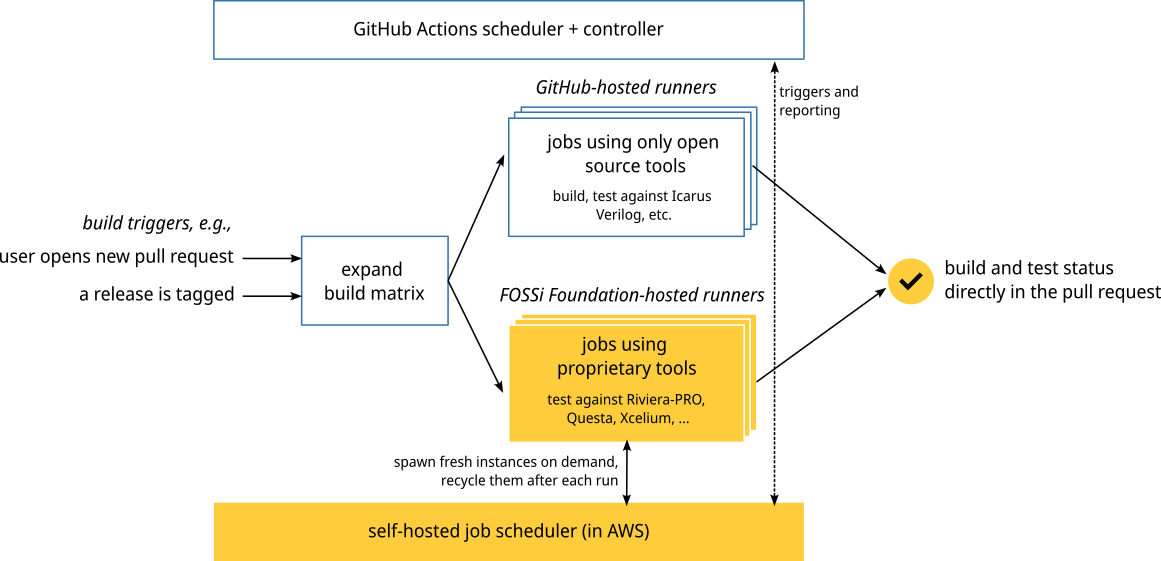
<p>Without further ado, this picture shows how the setup looks today:</p>

<p><img src="/assets/blog/2023-11-01-new-ci/cocotb-ci-2023.png" class="img-fluid mx-auto d-block p-3 p-md-5" alt="The new cocotb CI setup (schematic)" /></p>

<p>In our new setup, we’re only using GitHub Actions to manage CI jobs.
We started with a (reasonably standard) setup, which makes use of free GitHub Actions-provided runners (i.e., machines created on demand to execute tests).
That’s how we continue to run build and test jobs which only rely on open source tools.</p>

<p>To also run tests against proprietary tools, we extended this setup with into our own infrastructure.
Using the excellent <a href="https://github.com/philips-labs/terraform-aws-github-runner">Terraform module for scalable self hosted GitHub action runners</a> we were able to create a setup in Amazon Web Services (AWS) that hosts all proprietary tools in a secure way, and makes them available to run tests against them.</p>

<p>Whenever a new pull request is opened, the GitHub Actions scheduler will let our infrastructure know, which then spawns a fresh AWS EC2 instance with access to all necessary tools. After configuring itself, the instance registers with GitHub Actions and is assigned one of the test jobs.
After the job completes, the test result is reported to GitHub Actions, and the instance is terminated.</p>

<p>With this setup, we’re now able to scale our compute nodes up to the maximum amount of licenses we have available. And if there are no tests to be executed, we scale down to zero, i.e., the whole infrastructure is only paid for if there is actual demand for it.</p>

<p>But there’s more: Now that all testing is happening in GitHub Actions, we are able to test the release binaries right after they are built, but before they are uploaded to PyPi.
This ensures that we actually test the exact same binaries that we release later on, and prevent releases from happening which don’t pass this quality bar – all without human intervention.</p>

<p>We as cocotb project are thankful to the FOSSi Foundation and their sponsors for their financial support (after all, we have to pay AWS!). We also would like to thank our EDA tool partners, Aldec, Cadence, and Siemens, for their ongoing support, which made testing cocotb with proprietary simulators possible in the first place!</p>

<p>cocotb is a volunteer-driven open source project under the umbrella of the FOSSi Foundation.
Please reach out to Philipp at <a href="mailto:philipp@fossi-foundation.org">philipp@fossi-foundation.org</a> if you or your company want to support cocotb, either financially to help pay for costs such as running our continuous integration setup, or with in-kind donations, such as simulator licenses.</p>

<p>If you’d like to learn more about cocotb, have a look at <a href="https://www.cocotb.org">www.cocotb.org</a> for ways to get started.</p>

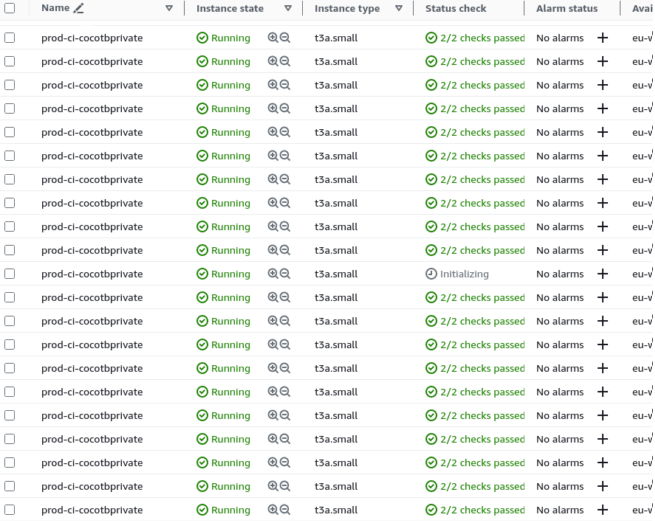
<p>To close with a picture, here’s the AWS EC2 console showing many parallel tests being run on individual test runners:</p>

<p><img src="/assets/blog/2023-11-01-new-ci/aws-console-instances.png" class="img-fluid mx-auto d-block p-3 p-md-5" alt="" /></p>]]></content><author><name>Philipp Wagner</name></author><summary type="html"><![CDATA[cocotb is a test framework, enabling users to test their Verilog or VHDL designs using Python-based testbenches. But at the same time, cocotb is also a piece of software that needs testing! As of today, this testing got even better: we are now running all tests against the exact release binaries we’re uploading to PyPi, including our tests against proprietary simulators such as Riviera-PRO, Questa, or Xcelium. At the same time, cocotb developers can be more productive, as the latency for pull request checks reduced from over an hour to around 15 minutes. This extended testing is exciting news for our cocotb users, who can enjoy even more rock-solid cocotb releases. And it’s exciting news for the free and open source silicon community as a whole: cocotb has worked hard to earn a place in the heart of thousands of verification engineers by being reliable and yet fun to work with. With our new CI system, we continue to push the boundaries of what’s possible in open source EDA and addressing both the technical as well as the non-technical issues along the way.]]></summary></entry><entry><title type="html">Announcing the cocotb unconference at ORConf</title><link href="https://www.cocotb.org/2023/08/02/orconf.html" rel="alternate" type="text/html" title="Announcing the cocotb unconference at ORConf" /><published>2023-08-02T00:00:00+00:00</published><updated>2023-08-02T00:00:00+00:00</updated><id>https://www.cocotb.org/2023/08/02/orconf</id><content type="html" xml:base="https://www.cocotb.org/2023/08/02/orconf.html"><![CDATA[<p>Today, we’re announcing the cocotb unconference as part of the <a href="https://www.orconf.org">ORConf Sunday Sessions</a> in Munich, Germany on Sept 17, 2023.</p>

<p>The cocotb user community is growing rapidly.
Every day, cocotb users write verification code, explore new use cases, and improve on existing ones.
Is there something you have figured out when using cocotb?
Is there something you’ve been wondering about, or something you’d like to have a discussion on?
Are you not yet using cocotb but interested in in-depth discussions with the maintainers and other users?
Then you’re fortunate: the cocotb project is hosting an unconference as part of the ORConf Sunday Sessions.
Many cocotb maintainers will be there as well!</p>

<p>We won’t have a fixed agenda: instead, everyone is invited to bring their own discussions topics, which we’ll then discuss either in a large group, or in smaller breakout groups.
The cocotb unconference will be an interactive event, tailored on the fly to the interests of its attendees.</p>

<p>When and where? Sunday, Sept 17, 2023 in Munich, Germany as part of <a href="https://www.orconf.org">ORConf</a>. The exact location will be announced later.</p>

<p>Interested in joining? Please <a href="https://orconf.org/">register <em>now</em> for ORConf</a>, even if you’re only planning to attend the cocotb unconference. Registration is free, with optional professional tickets available. <em>Please consider buying a professional ticket</em>, the proceeds are funding the FOSSi Foundation and with it the cocotb project, e.g., to pay for our continuous integration setup.</p>

<p>ORConf is an excellent opportunity to present your company to a highly technical audience of hardware engineers, and some sponsorship opportunities are still available.
Have a look at the <a href="https://orconf.org/orconf23_sponsor.pdf">ORConf sponsorship flyer</a> if you’re interested and get in touch!</p>]]></content><author><name>Philipp Wagner</name></author><summary type="html"><![CDATA[Today, we’re announcing the cocotb unconference as part of the ORConf Sunday Sessions in Munich, Germany on Sept 17, 2023. The cocotb user community is growing rapidly. Every day, cocotb users write verification code, explore new use cases, and improve on existing ones. Is there something you have figured out when using cocotb? Is there something you’ve been wondering about, or something you’d like to have a discussion on? Are you not yet using cocotb but interested in in-depth discussions with the maintainers and other users? Then you’re fortunate: the cocotb project is hosting an unconference as part of the ORConf Sunday Sessions. Many cocotb maintainers will be there as well! We won’t have a fixed agenda: instead, everyone is invited to bring their own discussions topics, which we’ll then discuss either in a large group, or in smaller breakout groups. The cocotb unconference will be an interactive event, tailored on the fly to the interests of its attendees. When and where? Sunday, Sept 17, 2023 in Munich, Germany as part of ORConf. The exact location will be announced later. Interested in joining? Please register now for ORConf, even if you’re only planning to attend the cocotb unconference. Registration is free, with optional professional tickets available. Please consider buying a professional ticket, the proceeds are funding the FOSSi Foundation and with it the cocotb project, e.g., to pay for our continuous integration setup. ORConf is an excellent opportunity to present your company to a highly technical audience of hardware engineers, and some sponsorship opportunities are still available. Have a look at the ORConf sponsorship flyer if you’re interested and get in touch!]]></summary></entry><entry><title type="html">Cocotb user survey 2023: the results are in</title><link href="https://www.cocotb.org/2023/06/17/user-survey-2023.html" rel="alternate" type="text/html" title="Cocotb user survey 2023: the results are in" /><published>2023-06-17T00:00:00+00:00</published><updated>2023-06-17T00:00:00+00:00</updated><id>https://www.cocotb.org/2023/06/17/user-survey-2023</id><content type="html" xml:base="https://www.cocotb.org/2023/06/17/user-survey-2023.html"><![CDATA[<p>For the second time in its history, cocotb has asked its users for input: how they are using cocotb, what they enjoy about it, what pain points they experience, and much more.
The results are now in, and paint an encouraging picture.
Cocotb not only works, but is enjoyed by many users, and the development priorities of the core development team match the expectations of our users.</p>

<p>The survey also identified some (not overly surprising) areas for improvement; primarily, the availability of learning resources and verification IP.</p>

<p>Read on for a more detailed look into the survey results.
We’ll not dive too deep into ways to address the pain points of our users – there are some ideas, and a number of limitations to the abilities of a volunteer-driven project.
Please reach out if you would like to get involved or have an idea!</p>

<!--more-->

<h2 id="about-our-users">About our users</h2>

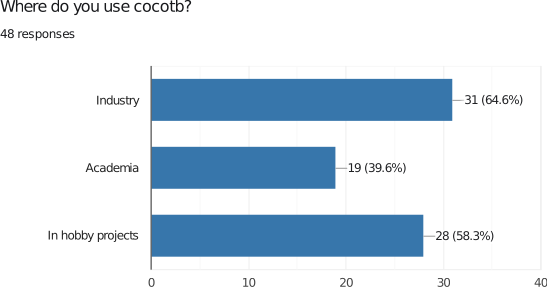
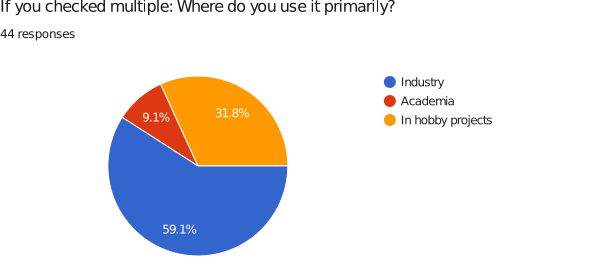
<p><strong>Cocotb is typically used in industry by a small team of up to ten people.</strong></p>

<p>Almost 60 percent of users use cocotb primarily in industry.
That’s not surprising, given the challenges for hobbyists to design their own ASIC or FPGA design.</p>

<p>However, many users don’t stop using cocotb at work: when given the choice to select all their uses, the use in industry still leads with 65 percent, but is closely followed by the use in hobby projects (58 percent) and in academia (40 percent).</p>

<p>This first set of numbers already indicates: cocotb is a tool our users <em>wish</em> to use, not something they <em>have</em> to use (grumpily).</p>

<div class="row">
  <div class="col-lg p-3 p-md-5">
    <img src="/assets/blog/2023-06-17-user-survey-2023/1-where-do-you-use-cocotb.svg" class="img-fluid mx-auto d-block" alt="Where do you use cocotb?" />
  </div>
  <div class="col-lg p-3 p-md-5">
    <img src="/assets/blog/2023-06-17-user-survey-2023/2-where-do-you-use-it-primarily.svg" class="img-fluid mx-auto d-block" alt="Where do you use cocotb primarily?" />
  </div>
</div>

<p>If you’re in industry, it’s rare that you’re doing verification on your own, and the answers reflect that.
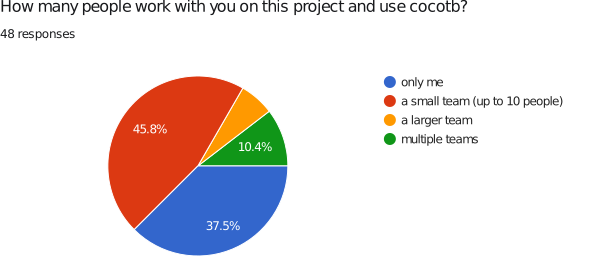
46 percent of respondents work in a small team on a cocotb project, with 10 percent of our users even having multiple teams using cocotb!</p>

<p><img src="/assets/blog/2023-06-17-user-survey-2023/5-projectsize.svg" class="img-fluid mx-auto d-block p-3 p-md-5" alt="projectsize" /></p>

<p>Silicon design projects are often unique, and so are the projects our respondents use cocotb for.
Common answers include:</p>

<ul>
  <li>Image and video processing (computer vision)</li>
  <li>Packet processing</li>
  <li>Signal processing algorithms</li>
  <li>Processor verification (RISC-V)</li>
  <li>Full system testing/integration testing</li>
</ul>

<h2 id="what-are-our-users-verifying">What are our users verifying?</h2>

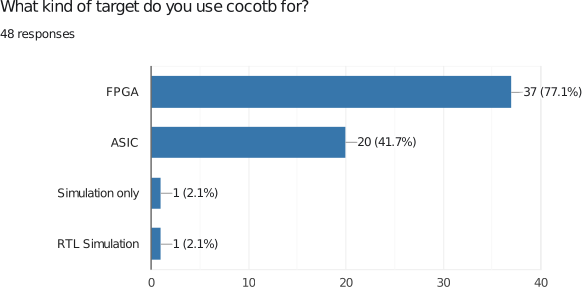
<p><strong>The typical cocotb user verifies an FPGA design written in Verilog.</strong></p>

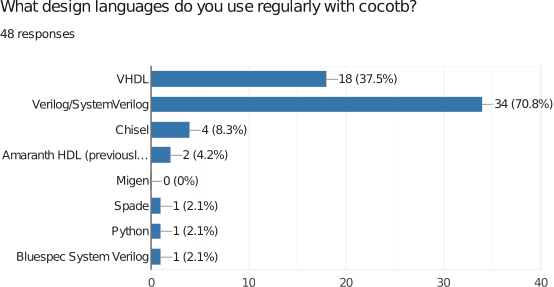
<p>Unsurprisingly, most cocotb users verify FPGA designs; with Verilog being the most popular language, not only among cocotb users.</p>

<p>What’s interesting is the increase in ASIC designs we’re seeing verified with cocotb: in 2020 (the last time we did the user survey), only 26 percent of our users were working on ASIC designs, compared to 42 percent in 2023, a growth of around 60 percent.
With ASIC designers being traditionally more risk-averse (for good reasons), this increase can be seen as indication that cocotb is being trusted to deliver good verification outcomes.</p>

<div class="row">
  <div class="col-lg p-3 p-md-5">
    <img src="/assets/blog/2023-06-17-user-survey-2023/3-target.svg" class="img-fluid mx-auto d-block" alt="Target platform" />
  </div>
  <div class="col-lg p-3 p-md-5">
    <img src="/assets/blog/2023-06-17-user-survey-2023/4-designlanguages.svg" class="img-fluid mx-auto d-block" alt="design languages" />
  </div>
</div>

<h2 id="why-not-something-else">Why not something else?</h2>

<p><strong>SystemVerilog UVM remains the primary verification choice – but cocotb users don’t really like it.</strong></p>

<p>Cocotb isn’t the only verification approach out there, and (we have to admit) not the most common one either.
SystemVerilog UVM has been the go-to choice for a while, and that’s reflected in our user base as well.
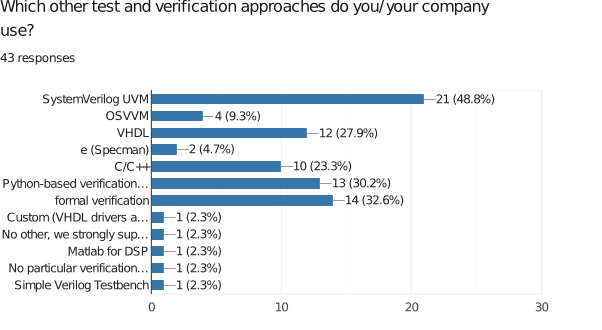
Roughly one third of users use formal verification, plain VHDL testbenches, or other Python-based verification approaches.
C or C++-based verification approaches (often combined with UVM) are used by 23 percent of our respondents.</p>

<p>The answers leave a lot of room for follow-up questions, like “how much of a design is actually verified using formal?” or “what does the in-house Python testbench look like?”.
We’d certainly be interested in an answer – reach out over social media to tell us more!</p>

<p><img src="/assets/blog/2023-06-17-user-survey-2023/6-otherapproaches.svg" class="img-fluid mx-auto d-block p-3 p-md-5" alt="design languages" /></p>

<p>When asked about the pain points of these other verification approaches, cocotb users repeatedly mentioned:</p>
<ul>
  <li>the complexity (and learning curve) of UVM</li>
  <li>poor CI/test framework integration</li>
  <li>the amount of boilerplate code and effort required until the actual writing of the test can start</li>
</ul>

<h2 id="how-our-users-run-cocotb">How our users run cocotb</h2>

<p><strong>The overwhelming majority of cocotb users uses a recent version of cocotb on Linux.</strong></p>

<p>Cocotb is open source, and freedom of choice and diversity have long been key values in open source.
Still, knowing the platforms the majority of our users run on is essential to properly focus our engineering and testing efforts.
Thankfully, the results we got match what we were expecting.</p>

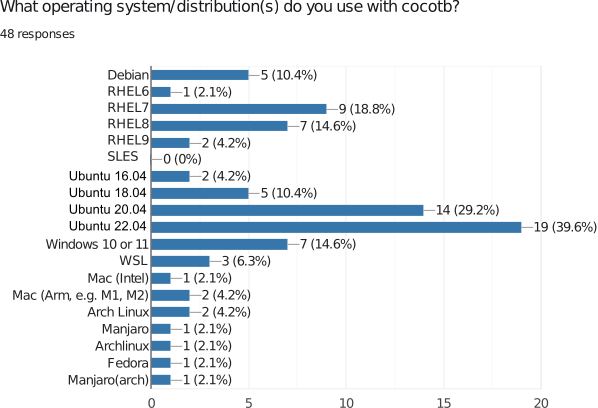
<p>The overwhelming majority of our users runs Linux, typically Red Hat Enterprise Linux or one of its derivatives, which tends to be most common in industry settings, or Debian or Ubuntu, which is used widely in “less managed” settings, as well as in CI.</p>

<p>Even though the cocotb project has spent a very significant amount of effort in engineering and support on it, our Windows user base remains comparably small.</p>

<p><img src="/assets/blog/2023-06-17-user-survey-2023/8-os-distro.svg" class="img-fluid mx-auto d-block p-3 p-md-5" alt="operating system or Linux distribution" /></p>

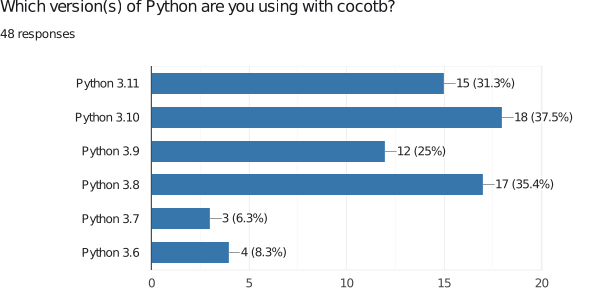
<p>Cocotb aims to support as many Python versions as possible, including versions which have been marked as “end-of-life” by the Python project itself (such as Python 3.6).
Each new Python version brings significant benefits, with the most recent versions also being substantially faster in many use cases.
We are therefore happy to see many users relying on recent or very recent versions of Python!</p>

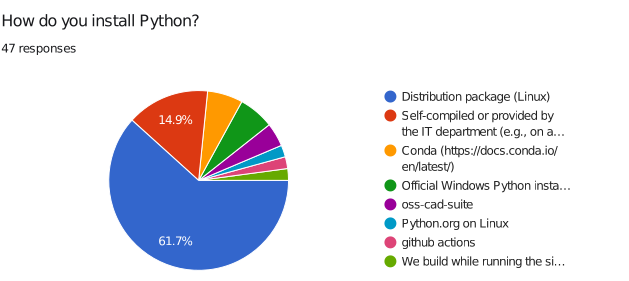
<p>Many things can go wrong when one tries to compile Python by itself, as opposed to using a (RPM or deb) package prepared by a Linux distribution, conda, or python.org.
We are therefore equally happy to see that the large majority of users makes use of these packages.</p>

<div class="row">
  <div class="col-lg p-3 p-md-5">
    <img src="/assets/blog/2023-06-17-user-survey-2023/11-python-version.svg" class="img-fluid mx-auto d-block" alt="Python installation source" />
  </div>
  <div class="col-lg p-3 p-md-5">
    <img src="/assets/blog/2023-06-17-user-survey-2023/7-install-python.svg" class="img-fluid mx-auto d-block" alt="Python installation source" />
  </div>
</div>

<p>Cocotb pushes a new release roughly twice a year, and takes great care in ensuring backwards-compatibility to allow our users to switch to the latest version.
The survey results confirm that this effort is paying off: 83 percent of users are on the latest 1.7 release (at the time of the survey).</p>

<p><img src="/assets/blog/2023-06-17-user-survey-2023/10-cocotb-version.svg" class="img-fluid mx-auto d-block p-3 p-md-5" alt="cocotb version" /></p>

<p>A look at the simulators used with cocotb completes the picture.
When choosing proprietary simulators, Cadence Xcelium and Siemens ModelSim and Questa lead the field.
In the world of open source simulators, Verilator and Icarus Verilog are the most popular choices.
Icarus Verilog is the default simulator in many cocotb tutorials and even its Makefiles, so its popularity is hardly surprising.
Equally, GHDL is the most mature open source VHDL simulator, hence being the go-to choice for VHDL developers.</p>

<p><img src="/assets/blog/2023-06-17-user-survey-2023/9-simulator.svg" class="img-fluid mx-auto d-block p-3 p-md-5" alt="Simulator" /></p>

<p>Finally, when asked for their wishlist of platforms cocotb should support, the most common answers were</p>

<ul>
  <li>Support for the Vivado simulator (xsim) [which unfortunately does not implement the VPI or VHPI interface], and</li>
  <li>Better support for GHDL [which is partially due to the fact that GHDL is uniquely using the VPI interface for VHDL, as well as missing features in GHDL itself].</li>
</ul>

<h2 id="verification-ip-or-cocotb-extensions">Verification IP or cocotb extensions</h2>

<p><strong>Most cocotb users use cocotb-test and a coverage extension, such as pyvsc or cocotb-coverage. Python implementations of UVM are popular with cocotb users as well, as is (AXI) bus IP.</strong></p>

<p>Cocotb is intentionally not solving every possible problem: it’s extensible and encourages users to choose their preferred extensions from the Python package ecosystem.</p>

<p>For users who need more than cocotb’s Makefile-based build system, cocotb-test is the go-to choice.
Functional coverage and constrained-random test generation are next on the list, with users mostly relying on pyvsc or cocotb-coverage.</p>

<p>As we’ll see below, the availability of verification IP (VIP) is one of the weak spots of cocotb.
Still, high-quality VIP is available, and many users resort to cocotbext-axi for AXI bus adapters or cocotbext-spi for SPI adapters.
Additionally, cocotb-bus provides a further set of bus interfaces which is commonly used.</p>

<p>Finally, despite many users choosing cocotb because it’s <em>not</em> UVM, a significant percentage of the respondents choose a UVM implementation in Python, with pyuvm being more popular than uvm-python, followed by in-house UVM-like methodologies.</p>

<h2 id="are-users-happy-with-cocotb">Are users happy with cocotb?</h2>

<p><strong>Users love cocotb!</strong></p>

<p>Cocotb users overwhelmingly love using it, and would recommend it to others.
That’s enouraging to hear, and indicates that we’re on the right path.
We are still not at the point where every cocotb user is fully satisfied (to the extent that’s ever possible), but overall the answers are very encouraging.</p>

<div class="row">
  <div class="col-lg p-3 p-md-5">
    <img src="/assets/blog/2023-06-17-user-survey-2023/12-enjoy.svg" class="img-fluid mx-auto d-block" alt="How much do you enjoy using cocotb (5 == most, 1 == not at all)" />
  </div>
  <div class="col-lg p-3 p-md-5">
    <img src="/assets/blog/2023-06-17-user-survey-2023/13-recommend.svg" class="img-fluid mx-auto d-block" alt="How likely are you to recommend cocotb to others?" />
  </div>
</div>

<p>Looking at the more detailed answers, we see common themes emerge:</p>

<p>Users love cocotb because</p>
<ul>
  <li>It is Python</li>
  <li>It is open source</li>
  <li>It integrates into the Python ecosystem</li>
</ul>

<p>Users are least happy about</p>
<ul>
  <li>The (lack of) tutorials and learning resources</li>
  <li>The (lack of) documentation</li>
  <li>The Makefile-based testrunner</li>
  <li>The availability of verification IP</li>
</ul>

<p>Interestingly, roughly an equal amount of users love and hate the cocotb installation through <code class="language-plaintext highlighter-rouge">pip install cocotb</code>.
We’d love to hear more from those users who struggle with the process, since we invested significantly into this area in recent releases.</p>

<p>The same themes also reflect in reasons why cocotb isn’t used more in projects.
41 percent of users are looking for more verification IP, and 33 percent for commercial support, and 26 percent for commercial training.
Finally, 31 percent are unsure about the maturity and future of cocotb.</p>

<p>If you are one of the users who are unsure about the future of cocotb: please reach out and let us know what you’re concerned about!
Cocotb has <a href="/2023/06/12/10-years-of-cocotb.html">just celebrated its 10th birthday</a> and sees regular updates from an active user base – what are we missing?</p>

<h2 id="a-look-at-the-cocotb-development-community">A look at the cocotb (development) community</h2>

<p><strong>The cocotb community is welcoming and attracting new users, most of which are happy with cocotb as it is.</strong></p>

<p>Most respondents to the survey are relatively new to cocotb, with around two thirds of users using cocotb for less than a year.
We could see that as indication for a growing community!</p>

<p><img src="/assets/blog/2023-06-17-user-survey-2023/14-howlong.svg" class="img-fluid mx-auto d-block p-3 p-md-5" alt="How long have you been using cocotb?" /></p>

<p>This survey reached many of the most active cocotb users, and the answers on the interaction with the community reflect that as well.
Still, 54 percent of our respondents have never opened a cocotb issue, and 75 percent have never contributed code through a pull request.</p>

<div class="row">
  <div class="col-lg p-3 p-md-5">
    <img src="/assets/blog/2023-06-17-user-survey-2023/15-issue.svg" class="img-fluid mx-auto d-block" alt="Have you ever reported an issue to cocotb?" />
  </div>
  <div class="col-lg p-3 p-md-5">
    <img src="/assets/blog/2023-06-17-user-survey-2023/16-pr.svg" class="img-fluid mx-auto d-block" alt="Have you ever contributed code/opened a pull request for cocotb?" />
  </div>
</div>

<p>It is encouraging to see that most respondents see their interaction with the cocotb project as helpful, welcoming and fast.
However, the picture isn’t as positive as it could be: 19 percent of respondents are unhappy with slow responses, 10 percent have experienced unproductive discussions.
While it is important to stress that cocotb is a volunteer-driven project, there are certainly areas where we can improve our processes.
These discussions are ongoing – please reach out if you have specific suggestions to make sure everybody feels supported and welcome in the best possible way!</p>

<p><img src="/assets/blog/2023-06-17-user-survey-2023/17-interaction.svg" class="img-fluid mx-auto d-block p-3 p-md-5" alt="If you interacted with the cocotb community in chat, GitHub issues or a pull request: did you enjoy that interaction?" /></p>

<h2 id="about-the-survey-itself">About the survey itself</h2>

<p>The cocotb user survey 2023 was open from May 30 to June 14, 2023 and attracted 48 answers.
The survey was promoted over the cocotb blog, Twitter, LinkedIn, and the cocotb chat.
We assume that this caused a bias towards the more active cocotb user base.</p>

<p>For comparision, the user survey 2020 did attract 111 responses.
It is unclear where the difference in responses is coming from.
One possible explanation might be the form of advertising chosen:
The survey in 2020 was advertised widely in a banner on the cocotb documentation, something we did not do this year.
All other statistics, such as <a href="https://pypistats.org/packages/cocotb">PyPi download statistics</a>, indicate a growing user base.</p>]]></content><author><name>Philipp Wagner</name></author><summary type="html"><![CDATA[For the second time in its history, cocotb has asked its users for input: how they are using cocotb, what they enjoy about it, what pain points they experience, and much more. The results are now in, and paint an encouraging picture. Cocotb not only works, but is enjoyed by many users, and the development priorities of the core development team match the expectations of our users. The survey also identified some (not overly surprising) areas for improvement; primarily, the availability of learning resources and verification IP. Read on for a more detailed look into the survey results. We’ll not dive too deep into ways to address the pain points of our users – there are some ideas, and a number of limitations to the abilities of a volunteer-driven project. Please reach out if you would like to get involved or have an idea!]]></summary></entry><entry><title type="html">cocotb 1.8 is out and makes your verification journey even more enjoyable</title><link href="https://www.cocotb.org/2023/06/15/v1.8.0.html" rel="alternate" type="text/html" title="cocotb 1.8 is out and makes your verification journey even more enjoyable" /><published>2023-06-15T00:00:00+00:00</published><updated>2023-06-15T00:00:00+00:00</updated><id>https://www.cocotb.org/2023/06/15/v1.8.0</id><content type="html" xml:base="https://www.cocotb.org/2023/06/15/v1.8.0.html"><![CDATA[<p>The cocotb project is proud to announce the immediate release of cocotb version 1.8.0.
This release focuses on bug fixes and reliability improvements, with some notable additions as well.</p>

<!--more-->

<p>One highly visible change is the expanded assertion rewriting.
When an <code class="language-plaintext highlighter-rouge">assert</code> statement fails, cocotb displays (with the help of pytest) the actual values that made the assertion fail, not only the variable names.
This mechanism is called “assertion rewriting,” and is now enabled not only for the test module (the one passed with the <code class="language-plaintext highlighter-rouge">MODULE</code> environment variable), but also for code in other modules (e.g., helpers, bus adapters, etc.).</p>

<p>A notable addition is the cocotb runner, a Python-based replacement for the Makefile-based build system to trigger a simulation run.
The runner is <em>experimental</em> at this point and focuses on cocotb’s own need to run tests.
However, we encourage you to give it a try and let us know if things are going in the right direction to work for your project as well.
The new section <a href="https://docs.cocotb.org/en/latest/runner.html">Building HDL and Running Tests</a> in the cocotb documentation will get you started.</p>

<p>As usual, many of the changes were simulator-specific.</p>

<p>Users of Aldec’s Riviera-PRO simulator will be pleased to hear that cocotb user <a href="https://github.com/Forty-Bot">@Forty-Bot</a> found (after many years) <a href="https://github.com/cocotb/cocotb/pull/3307/files">a small coding error</a> that lead to a number of signals in a design not being discovered by cocotb.
That’s fixed now, and aligns the set of discovered signals with other simulators.</p>

<p>Life got easier for our Icarus Verilog users: without the ability to pass a command-line option, dumping waveforms in Icarus Verilog traditionally required the addition of some lines of Verilog code to the design. That’s no longer necessary: Set <code class="language-plaintext highlighter-rouge">WAVES=1</code>  when running <code class="language-plaintext highlighter-rouge">make</code> and cocotb will take care of the rest.</p>

<p>Verilator, the open source Verilog simulator, is adding more and more features known from event-based simulators.
These features are enabled by passing the <code class="language-plaintext highlighter-rouge">--timing</code> flag when running Verilator, and cocotb can now better interact with the resulting simulation.
A number of further changes improved the interaction with Verilator even more, making cocotb and Verilator suitable for many use cases again with the latest release.
We know that many cocotb users would love to see better Verilator integration.
Work is ongoing, but gated by the amount of people available to do the work – so if you’re in a position to help out, please do so!</p>

<p>A much more detailed description of all changes in this first 1.8 release can be found in the <a href="https://docs.cocotb.org/en/v1.8.0/release_notes.html">release notes</a>.
Cocotb is a community project under the umbrella of the <a href="https://www.fossi-foundation.org/">FOSSi Foundation</a>.
Thanks to all sponsors of the <a href="https://www.fossi-foundation.org/sponsors">FOSSi Foundation</a> the cocotb project can make use of a continuous integration system which runs proprietary simulators in a compliant way.</p>

<p>We are very thankful to Aldec for providing a license for Riviera-PRO, and to Siemens EDA for providing a license for Questa, which enables us to continuously test cocotb against these simulators to ensure they continue to be well integrated.</p>

<p>Please reach out to Philipp at <a href="mailto:philipp@fossi-foundation.org">philipp@fossi-foundation.org</a> if you or your company want to support cocotb, either financially to help pay for costs such as running our continuous integration setup, or with in-kind donations, such as simulator licenses.</p>

<p>To close this release announcement, here are some statistics:</p>

<ul>
  <li>111 files changed, 2984 insertions(+), 1351 deletions(-)</li>
  <li>124 commits</li>
  <li>28 code contributors</li>
</ul>

<p>Out of those 28 contributors, 17 made their first-ever cocotb pull request!
Welcome to the cocotb project, and we hope to see even more from you going forward!</p>

<ul>
  <li><a href="https://github.com/mrv96">@mrv96</a> made their first contribution in <a href="https://github.com/cocotb/cocotb/pull/3031">PR 3031</a></li>
  <li><a href="https://github.com/jahagirdar">@jahagirdar</a> made their first contribution in <a href="https://github.com/cocotb/cocotb/pull/3120">PR 3120</a></li>
  <li><a href="https://github.com/tianrui-wei">@tianrui-wei</a> made their first contribution in <a href="https://github.com/cocotb/cocotb/pull/3128">PR 3128</a></li>
  <li><a href="https://github.com/mcheah">@mcheah</a> made their first contribution in <a href="https://github.com/cocotb/cocotb/pull/3086">PR 3086</a></li>
  <li><a href="https://github.com/davekeeshan">@davekeeshan</a> made their first contribution in <a href="https://github.com/cocotb/cocotb/pull/3189">PR 3189</a></li>
  <li><a href="https://github.com/shuuji3">@shuuji3</a> made their first contribution in <a href="https://github.com/cocotb/cocotb/pull/3210">PR 3210</a></li>
  <li><a href="https://github.com/gigo333">@gigo333</a> made their first contribution in <a href="https://github.com/cocotb/cocotb/pull/3214">PR 3214</a></li>
  <li><a href="https://github.com/FlyGoat">@FlyGoat</a> made their first contribution in <a href="https://github.com/cocotb/cocotb/pull/3231">PR 3231</a></li>
  <li><a href="https://github.com/G-ram">@G-ram</a> made their first contribution in <a href="https://github.com/cocotb/cocotb/pull/3240">PR 3240</a></li>
  <li><a href="https://github.com/TheZoq2">@TheZoq2</a> made their first contribution in <a href="https://github.com/cocotb/cocotb/pull/3252">PR 3252</a></li>
  <li><a href="https://github.com/c-thaler">@c-thaler</a> made their first contribution in <a href="https://github.com/cocotb/cocotb/pull/3261">PR 3261</a></li>
  <li><a href="https://github.com/kcuzner">@kcuzner</a> made their first contribution in <a href="https://github.com/cocotb/cocotb/pull/3288">PR 3288</a></li>
  <li><a href="https://github.com/ddribin">@ddribin</a> made their first contribution in <a href="https://github.com/cocotb/cocotb/pull/3294">PR 3294</a></li>
  <li><a href="https://github.com/Forty-Bot">@Forty-Bot</a> made their first contribution in <a href="https://github.com/cocotb/cocotb/pull/3312">PR 3312</a></li>
  <li><a href="https://github.com/tj-scherer">@tj-scherer</a> made their first contribution in <a href="https://github.com/cocotb/cocotb/pull/3321">PR 3321</a></li>
  <li><a href="https://github.com/Ingrimmel">@Ingrimmel</a> made their first contribution in <a href="https://github.com/cocotb/cocotb/pull/3329">PR 3329</a></li>
  <li><a href="https://github.com/mczyz-antmicro">@mczyz-antmicro</a> made their first contribution in <a href="https://github.com/cocotb/cocotb/pull/3316">PR 3316</a></li>
</ul>

<p>These numbers are impressive and showcase the power of the free and open source collaboration model.
To be able to sustain this amount of change and the high-quality review process behind it we are happy to have an active group of maintainers caring for cocotb and its users.
Thank you, and thanks to the whole cocotb community for coming together to create this unique piece of software.</p>

<p>And now, go and enjoy the best release of cocotb so far!</p>

<p>If you have questions or issues with this release head over to the <a href="https://github.com/cocotb/cocotb/issues">issue tracker</a> or <a href="https://github.com/cocotb/cocotb/discussions">open a GitHub discussion</a>.</p>]]></content><author><name>Philipp Wagner</name></author><summary type="html"><![CDATA[The cocotb project is proud to announce the immediate release of cocotb version 1.8.0. This release focuses on bug fixes and reliability improvements, with some notable additions as well.]]></summary></entry><entry><title type="html">Celebrating 10 years of making verification fun again</title><link href="https://www.cocotb.org/2023/06/12/10-years-of-cocotb.html" rel="alternate" type="text/html" title="Celebrating 10 years of making verification fun again" /><published>2023-06-12T00:00:00+00:00</published><updated>2023-06-12T00:00:00+00:00</updated><id>https://www.cocotb.org/2023/06/12/10-years-of-cocotb</id><content type="html" xml:base="https://www.cocotb.org/2023/06/12/10-years-of-cocotb.html"><![CDATA[<p>Hardware verification can be as rewarding as a treasure hunt.
Or as tedious as doing your tax returns.
With cocotb, the Python-based verification framework, engineers can enjoy more of the treasure hunt experience.
And today this experience is turning 10!</p>

<!--more-->

<p>cocotb had its <a href="https://github.com/cocotb/cocotb/commit/ff5ef727530ba350183a6f8feaa9f7db5b2de57e">first public commit</a> on June 12, 2013.
If you look back at cocotb at that time you’ll immediately notice one thing:
the syntax hasn’t changed much.
Coroutines and triggers were pretty much the same as they are in “modern” cocotb.
That’s the first take-away after ten years:
cocotb got the syntax right pretty much from the start.</p>

<p>So what happened since then?
First of all, of course, the syntax expanded and modernized, e.g. to make use of Python 3 features such as the <code class="language-plaintext highlighter-rouge">async</code> and <code class="language-plaintext highlighter-rouge">await</code> keywords.
But most importantly, cocotb matured.
Users love cocotb because it “gets out of the way”:
it just works, no matter what simulator, operating system or Python version you use.
Getting there was and is hard work.</p>

<p>Some challenges were technical.
Let’s take one example: cocotb is a rather unconventional Python package with binary components running embedded inside a simulator.
Initially, these binary components were compiled on the fly when running the simulation, which required every user to have a working C++ compiler setup.
Easy enough!
Unless you’re on Windows, or in one of those wonderful corporate EDA environments that only vaguely resemble an off-the-shelf Linux distribution.
For those users, their cocotb journey ended before they were even able to run a first testbench.
In the 1.2 release in 2019 we moved to compiling cocotb once when installing cocotb.
And in 2022 the 1.7 release removed the need for a C++ compiler completely by distributing pre-compiled binaries (Python wheels) to users on all major platforms (a total of 250 binaries, of which only one or two are ultimately used!).</p>

<p>Other challenges were less technical:
cocotb works with all major simulators, open source ones as well as proprietary ones.
Testing cocotb against these simulators used to require a lot of distributed, manual effort before every release – one major reason why releases happened very infrequently in the early years of cocotb.
Today, we are happy to have Aldec Riviera-PRO and Siemens Questa running in continuous integration alongside many open source simulators to ensure that every single commit in cocotb is integration-tested.
That’s possible thanks to great partnerships we have built up with Aldec and Siemens.
They provide us not only with simulator licenses, but also with support and a communication channel to ensure cocotb and their simulators work together smoothly, now and going forward.</p>

<p>A key enabler for these partnerships and the long-term success of cocotb was the <a href="https://www.fossi-foundation.org">FOSSi Foundation</a>.
The foundation is the legal home of the cocotb project, and provides administrative and financial support for it.</p>

<p>For the last ten years cocotb has continuously evolved to make verification fun (again).
Cocotb takes on the often tedious task of abstracting away differences between simulators and operating system environments to enable its users to focus on the fun part:
the testing itself.
This effort has paid off:
cocotb is thriving and enjoyed by more and more developers around the world, to the point of being used synonymous with “Python for hardware verification.”</p>

<p>Ten years of cocotb are ten years of work by dedicated volunteers writing code and documentation, answering user questions, educating others and spreading the word.
Let us all celebrate this work today!
Join the <a href="https://app.gitter.im/#/room/#cocotb_Lobby:gitter.im">cocotb chat</a> to say Thank You, or surprise one of the cocotb contributors with a drink next time you see them!</p>

<p>Of course, no celebration is complete without gifts, which we’ll slowly unwrap during the course of this week on the <a href="https://www.cocotb.org/blog">cocotb blog</a> and on the <a href="https://twitter.com/cocotbnews">@cocotbnews Twitter account</a>:
expect a new cocotb release, insights into our user base with the results of the cocotb user survey 2023, and the announcement of a dedicated cocotb workshop co-located with <a href="https://orconf.org">ORConf on September 17, 2023 in Munich, Germany</a>. If you haven’t done so you can already <a href="https://orconf.org/">register, submit a talk, or consider sponsoring this event</a>.</p>]]></content><author><name>Philipp Wagner</name></author><summary type="html"><![CDATA[Hardware verification can be as rewarding as a treasure hunt. Or as tedious as doing your tax returns. With cocotb, the Python-based verification framework, engineers can enjoy more of the treasure hunt experience. And today this experience is turning 10!]]></summary></entry><entry><title type="html">Your input is needed: please take part in the cocotb user survey</title><link href="https://www.cocotb.org/2023/05/26/survey.html" rel="alternate" type="text/html" title="Your input is needed: please take part in the cocotb user survey" /><published>2023-05-26T00:00:00+00:00</published><updated>2023-05-26T00:00:00+00:00</updated><id>https://www.cocotb.org/2023/05/26/survey</id><content type="html" xml:base="https://www.cocotb.org/2023/05/26/survey.html"><![CDATA[<p>Here’s an idea for you: grab a cup of your favourite beverage, and click on this link:
<a href="https://docs.google.com/forms/d/e/1FAIpQLScVleNw24McTAcSkY2g4T8lsuLJgIkbe4uZo0Rv6Efpl51GaA/viewform">cocotb user survey 2023</a>.</p>

<p>Cocotb is free to download and use for anyone without registration.
That’s why we need your help: how are you using cocotb?
What are you enjoying?
What do you think could improve?
And of course the most basic question: how many cocotb users are there?</p>

<p>The survey should take no longer than 10 minutes to complete.
Please reach out to Philipp at philipp@fossi-foundation.org if you have further comments or questions.</p>

<p>We will keep the survey open until June 4, 2023.
Please distribute it to your colleagues and cocotb friends!</p>

<p><a href="https://docs.google.com/forms/d/e/1FAIpQLScVleNw24McTAcSkY2g4T8lsuLJgIkbe4uZo0Rv6Efpl51GaA/viewform">Click here to take the cocotb user survey 2023</a>.</p>]]></content><author><name>Philipp Wagner</name></author><summary type="html"><![CDATA[Here’s an idea for you: grab a cup of your favourite beverage, and click on this link: cocotb user survey 2023. Cocotb is free to download and use for anyone without registration. That’s why we need your help: how are you using cocotb? What are you enjoying? What do you think could improve? And of course the most basic question: how many cocotb users are there? The survey should take no longer than 10 minutes to complete. Please reach out to Philipp at philipp@fossi-foundation.org if you have further comments or questions. We will keep the survey open until June 4, 2023. Please distribute it to your colleagues and cocotb friends! Click here to take the cocotb user survey 2023.]]></summary></entry></feed>